One design. Every App Store size.
Create your first screenshot set, then adapt it to the iPhone, iPad, and Mac specifications you need, without rebuilding the design from scratch.
 Download Shipper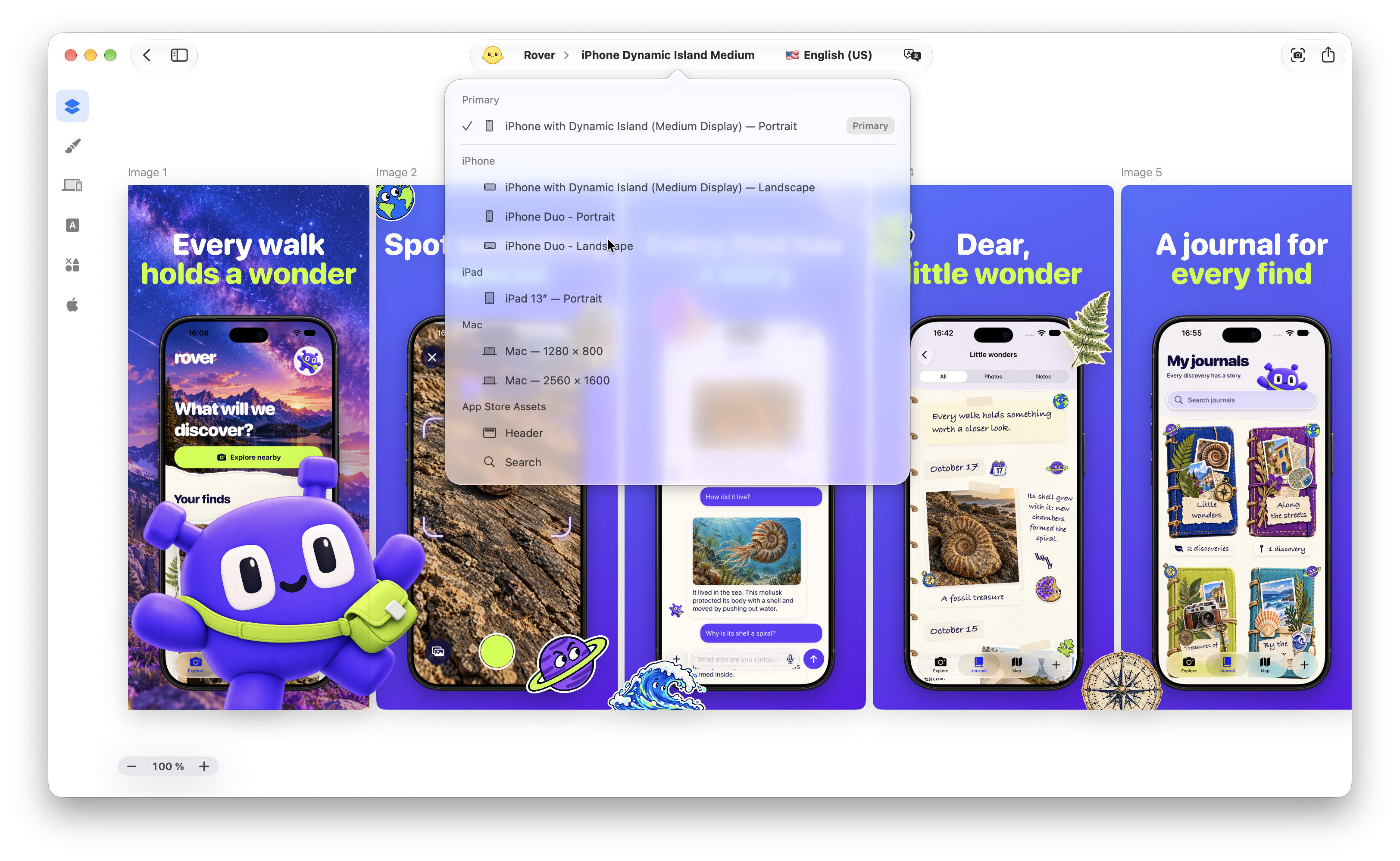
Pick a format. Start with the right canvas.
Choose from Shipper’s built-in specifications for device screenshots, App Store Header, and Search assets. The canvas dimensions are already set, so you can focus on your app’s message and how it looks.
A starting point. Room to refine.
Different screens create different design needs. Shipper preserves the foundation of the composition while giving you the freedom to review and refine each adapted version when needed.
From search to product page.
Create dedicated visuals for your App Store product page header and search results. Carry your colors, typography, and message across both placements, while tailoring each composition to its format.
Explore Shipper
What is an App Store screenshot specification?
An App Store screenshot specification defines the dimensions, platform, and orientation required for a screenshot set. Shipper turns these requirements into ready-to-use canvases.
Do I need to know Apple’s exact screenshot dimensions?
No. Every supported Shipper specification includes the correct canvas and export dimensions, so you can choose the destination without calculating or entering pixel sizes yourself.
Can I turn one screenshot set into multiple specifications?
Yes. Start with an existing design and adapt it to the supported iPhone, iPad, or Mac specifications you need.
Does Shipper simply resize the original screenshots?
No. Shipper adapts the composition to the destination rather than applying a blind image resize. It preserves the design foundation and important visual relationships wherever possible.
Will every adapted design be immediately ready to publish?
Not always. Different screen sizes and orientations can require visual refinements. Shipper handles the hardest part by creating a coherent starting point, then lets you review and adjust each canvas.
Do I need to rebuild the design for iPad or Mac?
No. Shipper carries the original visual direction into the new specification so you can refine the adaptation instead of starting again from a blank canvas.
Does Shipper support portrait and landscape screenshots?
Yes. You can adapt your design to supported portrait and landscape specifications when they are available for the selected platform.
Does Shipper support iPhone Duo?
Yes. Shipper includes dedicated iPhone Duo screenshot specifications and device poses that account for its foldable design.
Does Shipper support App Store Header and Search assets?
Yes. Shipper includes dedicated specifications for Header and Search assets, alongside its device screenshot formats.
Can I use Adaptive Screenshot Specs with Localization?
Yes. Screenshot specifications and localizations remain inside the same Shipper project, allowing you to manage the required device sizes and markets without separate folders or projects.
Can Codex adapt my screenshots?
Yes. With the Shipper Plugin, Codex can create the supported screenshot specifications you request and review each adapted canvas in context.
Can I publish the adapted sets to App Store Connect?
Yes. Once the specifications and localizations are ready, App Store Connect Publishing can send the selected screenshot sets from the same Shipper project.
Is Adaptive Screenshot Specs available for free?
Yes. Adaptive Screenshot Specs is available for free in Shipper.
Create once. Carry the design forward.
Meet Apple’s screenshot requirements across iPhone, iPad, and Mac. Your original design stays the starting point.
Download ShipperFree to adapt and export.