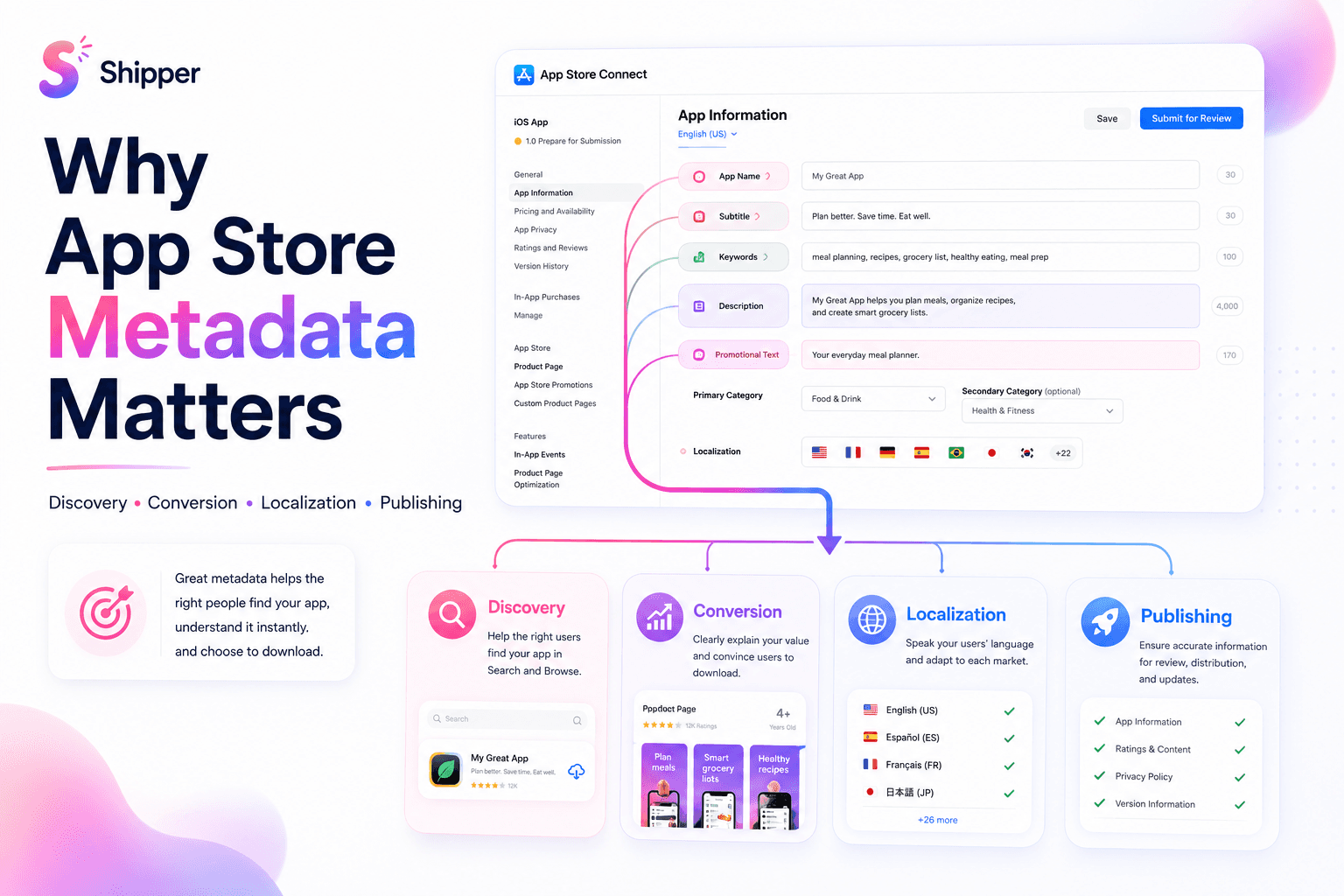
App Store metadata is the information you submit in App Store Connect to describe, categorize, and present your app. It includes your app name, subtitle, keywords, description, promotional text, categories, URLs, and localizations.
It matters because metadata connects three parts of App Store growth: discoverability, product-page clarity, and reliable publishing. Strong metadata helps the right people find your app, understand it quickly, and decide whether it fits their needs.
What App Store metadata includes
It helps to separate metadata by the job each field performs.
Search metadata includes the app name, subtitle, keyword field, and categories. Apple says text relevance for the title, subtitle, keywords, and primary category is one factor used in App Store search.
Conversion metadata includes the description, promotional text, and What’s New text. These fields explain the product, its current value, and recent improvements.
Product-page assets include the icon, screenshots, and app previews. They aren’t text metadata, but they work with it. A subtitle can make a promise. The first screenshots should make that promise clear and believable.
Operational metadata includes URLs, age-rating information, review details, and other submission fields. Some fields describe the public product. Others help Apple review and distribute it.
Why App Store metadata affects discovery
Apple states that search results consider text relevance alongside user behavior such as downloads, ratings, and reviews. Metadata can improve relevance, but it can’t compensate for an app that people don’t want or trust.
Start with the fields Apple identifies for search:
Write a distinct, understandable app name.
Use the subtitle to describe a useful outcome or core use case.
Fill the 100-character keyword field with relevant terms.
Select the categories that best represent the app.
Avoid repeating words already used in the app name, subtitle, or category inside the keyword field. Apple also advises against generic terms, irrelevant keywords, competing app names, and unauthorized trademarks.
Promotional text doesn’t affect search ranking. Apple also tells developers not to add unnecessary keywords to the description to improve search results. Use those fields to persuade and inform, not to create a keyword list.
For a broader explanation of how metadata fits into discoverability and conversion, read What is ASO?.
Why metadata affects product-page clarity
A person arriving from search or a recommendation should understand the app without decoding your copy. Metadata creates the verbal story. Screenshots provide the visual proof.
Consider a hypothetical meal-planning app. A vague subtitle such as “Make life better” says little. “Plan meals and grocery lists” gives the visitor a category, an action, and an expected outcome. The first screenshots can then show weekly planning, automatic lists, and recipe organization.
Consistency matters more than cleverness. If the subtitle promises team collaboration but the screenshots show only personal workflows, the page feels incomplete. If the description leads with technical architecture while customers care about saving time, the message starts in the wrong place.
Review your app name, subtitle, opening description, and first three screenshots as one sequence. Our guide to designing App Store screenshots that convert explains how to build a clear visual narrative.
Localization is more than translation
App Store Connect lets you localize product-page information for different languages and regions. This gives you a chance to adapt both meaning and search terms.
A direct translation may be accurate but unnatural. People in another market may describe the same task differently. Research how local users express the problem, then adapt the subtitle, keywords, description, and screenshots together.
Treat every localization as a complete product page. Review text length, tone, terminology, screenshot copy, and links before release. Also verify Apple’s current language-support behavior, because incomplete localizations can display fallback information from another localization.
A practical metadata workflow
Use this order for a new app or major positioning update:
Define the audience and the main problem the app solves.
Choose one clear promise for the app name and subtitle.
Map relevant terms to the name, subtitle, keywords, and category without repetition.
Write the description for humans, starting with the strongest reason to care.
Align the first screenshots with the same promise.
Localize the page as a complete experience.
Verify required URLs, review information, and platform-specific fields.
Preview the page and check it against current App Store screenshot guidelines.
After release, use App Analytics to monitor impressions, conversion rate, and downloads.
Before submission, use an App Review screenshot checklist and confirm that the visible page matches the current app.
FAQ
What is App Store metadata?
App Store metadata is the information submitted through App Store Connect to describe, categorize, review, and present an app. It includes the app name, subtitle, keywords, description, categories, URLs, and localizations.
Which App Store metadata affects search ranking?
Apple identifies the app title, subtitle, keywords, and primary category as text-relevance signals for App Store search. Search also considers factors beyond metadata, including downloads, ratings, and reviews.
Does the App Store description affect keyword ranking?
Apple advises developers not to add unnecessary keywords to the description to improve search results. Write the description to explain the app clearly. Use the dedicated keyword field, name, subtitle, and accurate category for search relevance.
App Store metadata is part of the product
App Store metadata isn’t administrative text added after development. It shapes how people find the app, what they expect, and whether the product page feels coherent.
Prioritize accuracy, relevance, and consistency. Use search-facing fields for discoverability, persuasive fields for clarity, and localized assets for each audience. Then keep the metadata aligned with the app as it evolves.
If you want a more organized way to create, localize, and publish screenshots and metadata, a workflow-focused macOS tool like Shipper can help keep those assets together.